May 07, 2026
Thumbnail Hacks: How Creators Get Better CTR Without Prompt Engineering
Let me ask you something honest.
How much time do you spend on your video thumbnail?
One hour? Two hours? Maybe more?
You carefully choose the right frame from your video. You add text. You adjust colors. You try to make it "pop."
Then you upload it to YouTube. And your click-through rate is... 3%. Maybe 4% if you are lucky.
Frustrating, right?
Here is the hard truth: Most creators are guessing when they make thumbnails. They do not know what will actually get clicks. They just try to make it look "good."
But there is a better way. A way used by top creators who consistently get 10%+ CTR.
They do not guess. They copy what already works.
Let me explain how you can do the same without any design skills and without writing a single AI prompt.
The Problem with Making Thumbnails Today
Most creators fall into one of these traps.
Trap 1: The "Make It Pop" Trap
You open Canva or Photoshop. You add bright colors. You add big text. You add arrows and circles. You try to make it "pop." But you have no idea if any of it actually works. You are just guessing.
Trap 2: The "Copy Big Creators" Trap
You look at what MrBeast or other big creators are doing. You try to copy their style. But you are copying from memory. You are guessing what colors they use. You are guessing their text placement. Your version never looks quite right.
Trap 3: The "Prompt Engineering" Trap
You try using AI image tools. But now you have a new problem. You spend 20 minutes writing the perfect prompt. "A shocked face, dramatic lighting, red background, bold white text, YouTube thumbnail style, high contrast, 4K." The AI gives you something that looks okay. But it is not exactly what you wanted. And it took forever.
There has to be an easier way.
There is.
The Solution: Copy Proven Thumbnail Styles with Reference Images
Here is the hack that top creators use.
Instead of guessing what works, find a thumbnail that is already getting millions of views. A thumbnail from a video in your niche that went viral.
That thumbnail is proof that the style works. Real people clicked on it. The algorithm rewarded it.
Now here is the smart part. Do not try to describe that thumbnail to an AI with words. That would take forever and you would get it wrong.
Instead, use that thumbnail as a reference image.
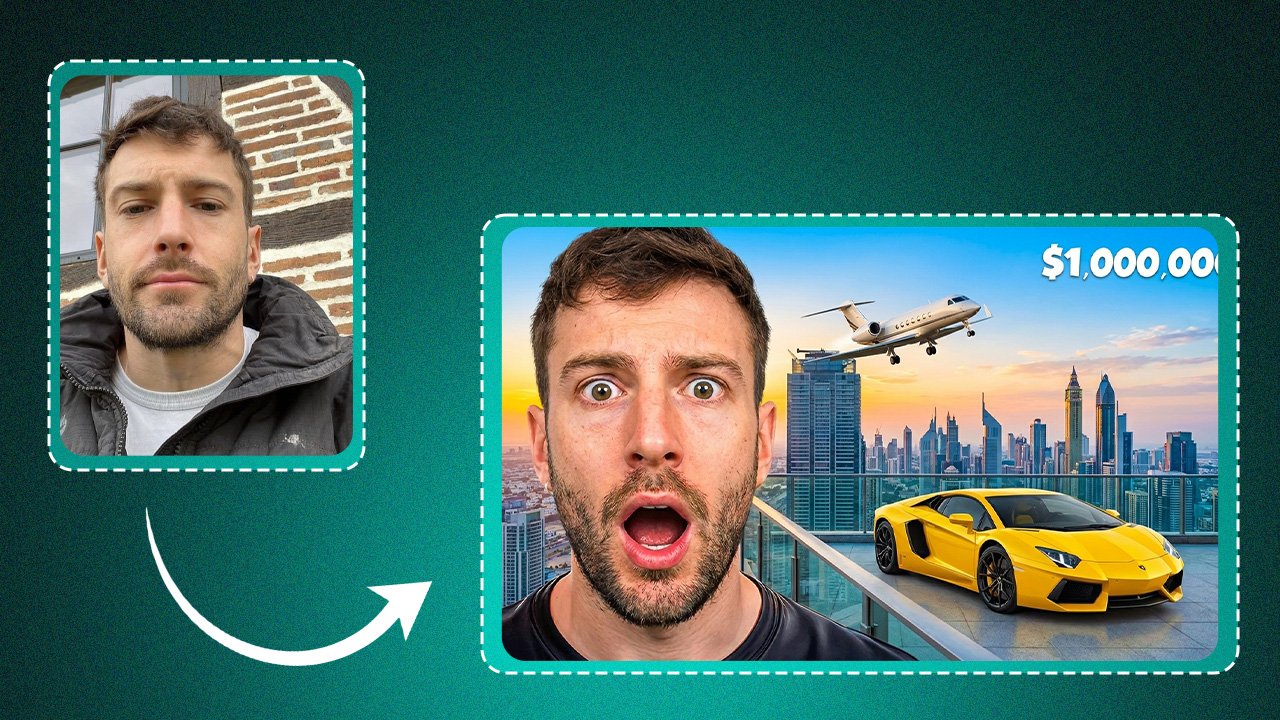
Take a screenshot of that viral thumbnail. Upload it to PicRevamp as your reference image. Upload your own face or a frame from your video as your subject image.
The AI will transform your face to match the exact colors, lighting, contrast, and mood of that viral thumbnail.
Your face. Their proven style.
No guessing. No prompts. Just results.
Step-by-Step: How to Copy Any Thumbnail Style
Let me walk you through exactly how to do this.
Step 1: Find a Viral Thumbnail in Your Niche
Go to YouTube. Search for topics related to your channel.
Find a video that has:
Millions of views
Was published in the last 6 months
Is from a creator in a similar niche as you
Do not worry about the content of the video. Only look at the thumbnail.
What do you notice about it?
What colors are used?
Is the lighting bright or dark?
Is the face showing emotion (shocked, happy, angry)?
Is there text? What color is the text?
Is the background simple or detailed?
Take a screenshot of this thumbnail. Save it to your computer or phone.
Step 2: Take or Choose Your Face Image
Now you need a photo of your own face.
You have two options.
Option A: Take a selfie making a similar expression as the viral thumbnail. If the viral thumbnail has a shocked face, make a shocked face in your selfie. If it has a smiling face, smile in your selfie.
Option B: Extract a frame from your video. Pause your video at a moment where your face looks similar to the viral thumbnail's expression.
Save this as your subject image.
Step 3: Upload Both Images to PicRevamp
Go to PicRevamp.
Upload your face image to Box 1 (Face Image).
Upload the viral thumbnail screenshot to Box 2 (Reference Image).
Click Generate.
Step 4: See Your Transformed Thumbnail
In about 10 to 15 seconds, the AI returns your new thumbnail.
Look at it carefully.
Your face is still your face. Your expression is still your expression.
But everything else has changed to match the viral thumbnail.
The colors are now the same as the viral thumbnail. The lighting matches. The contrast matches. The mood matches.
You now have a thumbnail that looks professionally made and uses a proven style that real people already clicked on.
Step 5: Add Text (Optional)
The AI generates the face and background. But it does not add text.
Use a free tool like Canva, Photopea, or even your phone's photo editor to add 3-5 words of text on top.
Keep the text:
Short (3-5 words max)
High contrast (white text with black outline works best)
Placed where it does not cover the face
That is it. Your new thumbnail is ready.
Real Example: How a Gaming Creator Used This
Let me give you a real example so you see how powerful this is.
Meet Alex. He runs a small gaming channel. His thumbnails were... average. His CTR was stuck at 4%.
Alex found a viral thumbnail from a popular gaming creator. The thumbnail had:
A shocked face
Bright orange and yellow colors
High contrast
A dark background with some glow effects
Alex took a selfie making a shocked face. He uploaded his selfie + the viral thumbnail screenshot to PicRevamp.
The AI transformed his selfie to match the exact colors and lighting of the viral thumbnail. His face now had that bright, high-contrast look. The background gained the same dark-with-glow effect.
Alex added three words of text: "I CAN'T BELIEVE IT"
He uploaded his new thumbnail.
His CTR went from 4% to 11% in one week.
He did not guess. He did not write prompts. He just copied what already worked.
What Thumbnail Styles Work Best for Copying?
Based on testing with creators, these thumbnail styles copy very well using reference images.
Style 1: The Shocked Face + Bright Colors
This is the most common viral thumbnail style. One face making an exaggerated shocked or surprised expression. Bright, saturated colors (often red, orange, or yellow). High contrast. Dark or blurred background.
This style copies extremely well. The AI easily matches the bright colors and high contrast.
Style 2: The Comparison Thumbnail
Two images side by side. Before and after. Good vs bad. Old vs new.
You can use PicRevamp to generate both sides. Find a reference thumbnail that uses this layout. Copy its colors and lighting. Apply to your face or product images.
Style 3: The Minimal Face + Bold Text
A calm or neutral face expression. Clean background. Bold, simple text taking up half the thumbnail.
This style is harder to find in viral videos, but when it works, it works very well. The AI can copy the clean, professional look easily.
Style 4: The Dark & Mysterious
Dark background. One face with dramatic lighting (half face lit, half in shadow). Usually used for storytelling or mystery videos.
This style copies beautifully because the AI is very good at matching specific lighting directions.
Style 5: The Product Highlight
Used by tech reviewers and unboxing channels. A product (phone, camera, gadget) taking up most of the frame. Bright, clean lighting. Usually a gradient or simple colored background.
You can use this for product thumbnails even if you do not have professional product photos. The AI transforms your simple product photo to match the lighting and background of the reference.
Pro Tips for Thumbnail Success
Tip 1: Do Not Copy Exactly
The goal is not to make an identical thumbnail to the viral one. The goal is to copy the style. Colors, lighting, contrast, mood. Your face and your expression should still be yours. Your text should be unique to your video.
Tip 2: Test Different References
Try 3-4 different viral thumbnails as references for the same face image. See which style looks best on your face. Some styles will suit you better than others.
Tip 3: Keep Text Simple
AI does not generate text. After you get your transformed face image, add text yourself. Keep it to 3-5 words max. Make sure the text is readable on mobile screens (most YouTube views are on phones).
Tip 4: Use High Resolution
When you take a screenshot of a viral thumbnail, try to get it as large as possible. Right-click the video thumbnail on YouTube and select "Open image in new tab" to get the highest resolution version.
Tip 5: Analyze Before You Copy
Before you copy a thumbnail style, ask yourself why it works. Is it the color? The expression? The contrast? Understanding why will help you choose better references in the future.
Common Questions
Q: Is this cheating?
No. Every successful creator studies what works and learns from it. You are not stealing someone else's thumbnail. You are creating your own face with a similar visual style. This is no different from noticing that successful creators use certain colors or layouts.
Q: Can I copy thumbnails from any niche?
Yes, but stay within your niche. A thumbnail style that works for gaming might not work for education. A style that works for beauty might not work for tech. Find viral thumbnails from creators in your specific category.
Q: What if the viral thumbnail has a different face shape than mine?
Does not matter. The AI copies the style, not the face. Your face stays yours. The other person's face does not appear in your output.
Q: Will YouTube penalize me for similar thumbnails?
No. YouTube does not penalize similar visual styles. Thousands of creators use similar color schemes and layouts. As long as your content is original and your thumbnail is not identical, you are fine.
Q: How many thumbnail styles should I save?
Save 10-20 viral thumbnails that you like. Use them as your reference library. Try different ones for different videos. Over time, you will learn which styles work best for your face and your audience.
Try This Hack Today
You do not need to be a designer. You do not need to learn prompt engineering. You do not need to guess what works.
Find a viral thumbnail. Take a selfie. Upload both to PicRevamp. Get your transformed thumbnail in seconds.
Stop guessing. Start copying what works.
👉 Try PicRevamp for Free
(2 free images. No credit card required. Make better thumbnails today.)
Final Thoughts
Your content might be amazing. But if your thumbnail does not get clicks, nobody will ever know.
Thumbnails are not about art. They are about communication. They need to tell a viewer in 1 second why they should click.
The easiest way to communicate effectively is to use visual language that already works.
Find what works. Copy the style. Make it your own.
That is not cheating. That is smart creation.
Now go make some thumbnails that actually get clicked.