May 07, 2026
How to Copy Any Photo Style Without Writing a Single Prompt
You know that feeling when you see a photo and think, "I wish I could get that exact look"?
Maybe it's a celebrity on a magazine cover. The lighting is soft. The background is dreamy. The skin has this warm, golden glow.
Or maybe it's a movie scene. Dark, moody, intense shadows. Everything looks cinematic.
Or a product ad. Clean, bright, premium feeling.
You want that look for your own photos. But how do you get it?
The old way: You spend hours in Photoshop trying to match colors. Or you write 100 words of prompts and hope the AI understands.
The better way: You just show the AI what you want. Let me explain how easy this really is.
Step 1: Find a Reference Image You Love
This is the fun part. You can pick literally any image.
Here are some ideas to get you started:
A screenshot from your favorite movie
A celebrity red carpet photo
A painting from an art museum website
A travel photo with beautiful natural lighting
A product ad from a brand you like
An old vintage photo with classic colors
A nature photo with dramatic sky and clouds
The photo does not need to be perfect. It just needs to have a style that you want to copy.
Keep this image saved on your phone or computer. You will use it as your reference.
Step 2: Take or Choose Your Face Image
This is the photo you want to transform.
It can be:
A selfie you just took
A portrait photo from last week
A photo of your product (shoe, bag, watch, etc.)
A picture of your pet (why not?)
The only requirement is that your face or object is clearly visible. Good lighting helps. But the AI can work with average photos too.
Do not worry about the background or the colors in your face image. Those will change. Only your face or object shape will stay the same.
Save this image as your subject.
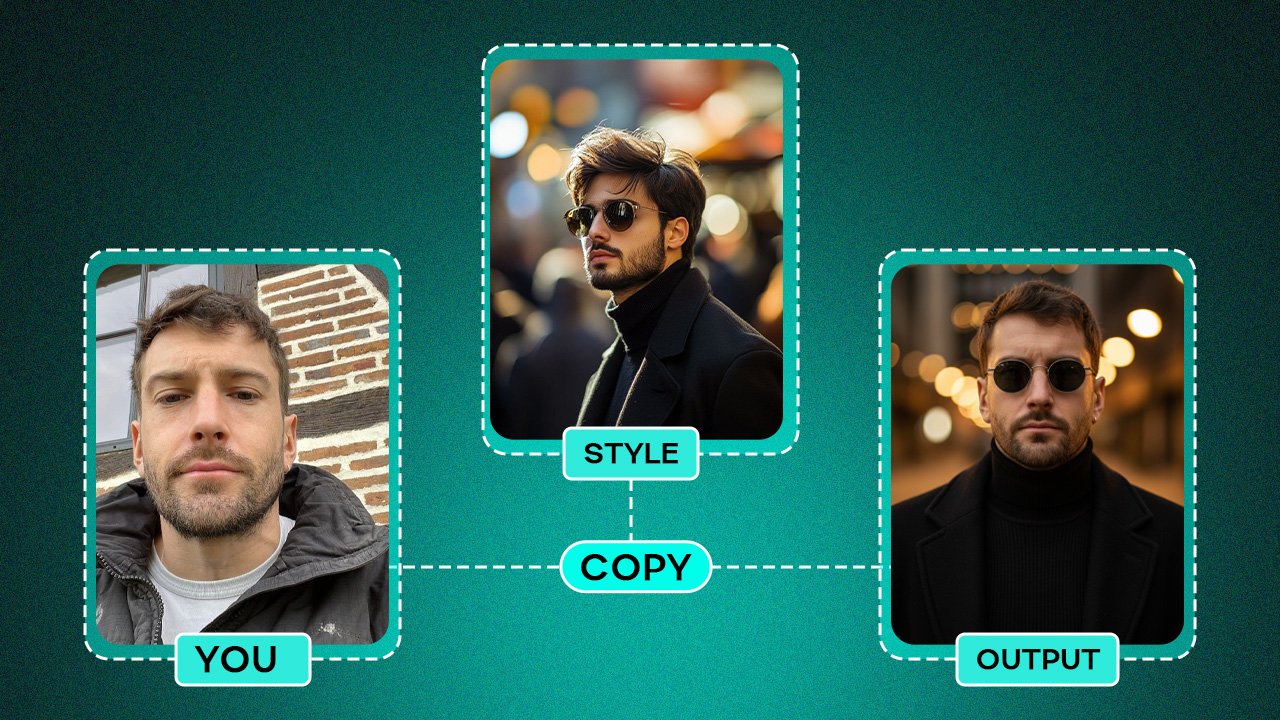
Step 3: Upload Both Images to PicRevamp
Go to PicRevamp website. You will see two upload boxes.
Box 1: Upload your face image (the photo you want to change)
Box 2: Upload your reference image (the style you want to copy)
That is all you do. No text box to fill. No prompts to write. No settings to adjust.
Click the Generate button.
Step 4: Watch AI Copy the Exact Style
In about 10 to 20 seconds, the AI returns your transformed photo.
Now look closely at the result.
Your face is still your face. Your eyes, your nose, your smile, your expression are all the same.
Now look at everything else.
The colors have changed to match your reference image. If your reference had warm golden tones, your photo now has warm golden tones.
The lighting has changed. If your reference had soft dreamy lighting, your photo now has soft dreamy lighting.
The mood has changed. If your reference looked dark and intense, your photo now looks dark and intense.
The background may have changed. If your reference had a blurred city background, your photo might get a similar feeling.
You did not type a single word. You just showed the AI what you wanted. And it understood perfectly.
Real Examples of What You Can Copy
Let me give you specific examples so you understand the power of this.
Example 1: Copy Celebrity Red Carpet Lighting
Your face image: A normal selfie taken in your living room. Average lighting. Boring background.
Your reference image: A photo of a movie star at the Oscars. Dramatic spotlight. Dark background. Golden skin tone.
The result: You look like you are on the same red carpet. Your face stays yours. But the lighting transforms to that dramatic, premium look. Your skin gets that warm golden glow. The background fades to dark and elegant.
Example 2: Copy Vintage Film Photography
Your face image: A recent portrait. Modern clothes. Digital camera look.
Your reference image: A photo from 1975. Grainy texture. Faded colors. Slightly washed out. Warm, nostalgic feeling.
The result: Your portrait looks like it was taken 50 years ago. The colors fade. The grain appears. The warm nostalgic feeling comes through. But your face still looks like you.
Example 3: Copy High-End Product Photography
Your face image: Wait, you don't need a face for this. You can transform products too.
Your subject image: A simple photo of a watch on your desk. Nothing special. Bad lighting. Messy background.
Your reference image: A luxury watch ad from a magazine. Clean white background. Soft even lighting. Premium, expensive feeling.
The result: Your watch now looks like it belongs in that magazine. Same watch. But the background becomes clean white. The lighting becomes soft and professional. The whole image feels premium.
Why This Works Better Than Text Prompts
Let me explain the science in simple terms.
When you write a text prompt, you are translating a visual idea into words. Then the AI translates those words back into a visual. Every translation loses information.
"Warm lighting" could mean 50 different things. "Vintage" could mean 100 different things. "Cinematic" is different for every person.
When you use a reference image, there is no translation. You give the AI a visual. It understands a visual. Nothing gets lost.
This is why reference images are always more accurate than text prompts. Always.
Pro Tips for Best Results
Tip 1: Use Clear Reference Images
The AI copies what it sees. If your reference image is blurry or dark, your output might also be blurry or dark. Choose reference images that are sharp and well-lit.
Tip 2: Match the Subject Type
A face reference works best for face transformations. A product reference works best for product transformations. If you want to transform your face, choose a reference image that also has a face.
Tip 3: Experiment with Different References
One reference might give you a result you love. Another reference might give you something even better. Try 2-3 different reference images for the same face image. See which style you like most.
Tip 4: Save Your Favorite Reference Images
Once you find a reference style that works well, save it. You can use it again and again for different face images. Over time, you will build a library of your favorite styles.
Tip 5: Use High Resolution Images
Higher resolution inputs lead to higher quality outputs. If you can, upload images that are at least 1024x1024 pixels. Avoid very small or heavily compressed images.
Common Questions
Q: Can I copy a style from a photo that is not mine?
Yes. The reference image is just for style. You are not stealing the photo. You are copying the colors, lighting, and mood. This is how all artists learn and create.
Q: What if my reference image has a different face than mine?
That is perfectly fine. The AI copies the style from the reference image, not the face. Your face stays yours. The other person's face does not appear in your output.
Q: How close will the output look to my reference?
Very close. The AI copies the color palette, the lighting direction, the contrast level, and the overall mood. Small details might vary, but the overall style will match clearly.
Q: Can I copy a style from a painting or drawing?
Absolutely. Paintings have unique color palettes and textures. You can copy the look of watercolor, oil painting, sketch, or any art style.
Q: How many styles can I try on one face?
As many as you want. Each generation uses credits. Paid plans give you between 10 and 250 images per month. You can try a different reference image every time.
Try It Yourself Today
You do not need to learn prompt engineering. You do not need to take a course. You do not need to memorize keywords.
You just need two images.
Find a reference photo you love. Take a selfie. Upload both. Click Generate.
See the magic happen.
👉 Try PicRevamp for Free
(2 free images. No credit card required. Just upload and generate.)
Final Thoughts
For years, AI companies told us we needed to learn how to talk to machines. Write better prompts. Use the right syntax. Master the keywords.
That was never the right answer.
Machines should learn to understand us. And humans understand visuals better than words.
A reference image is the most natural way to communicate a style. You see it. You like it. You show it. The AI copies it.
No words needed.
That is the future of AI image generation. No prompts. Just results.
Stop writing. Start showing. Try PicRevamp today.